
Making the Invisible Visible at the Museum




The 30-second version
The Burke Museum lets visitors watch scientists work through glass walls, but most had no idea what they were looking at, so I researched visitor behavior and staff workflows and found that visitors wanted to learn while scientists wanted to teach directly. Instead of recommending costly new exhibits, I designed a lightweight QR-based experience and staff dashboard that fit existing workflows and achieved a 90% task completion rate with no new hardware.
Overview
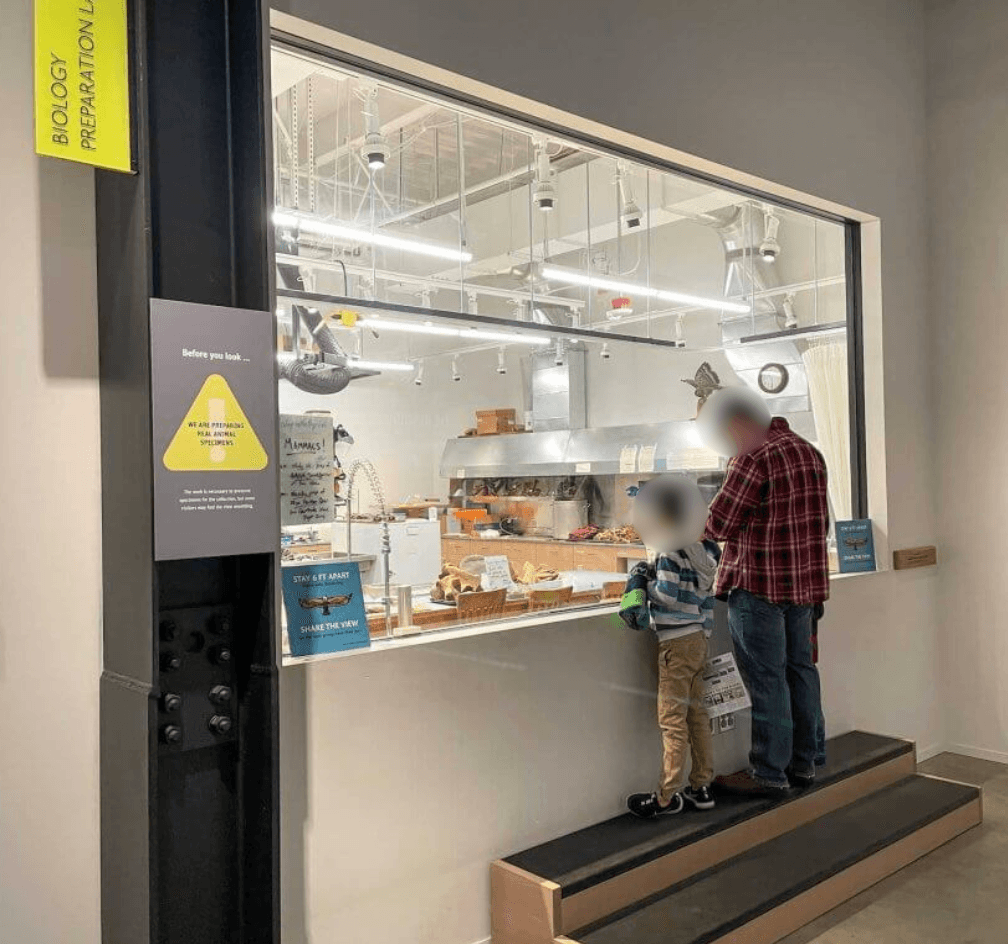
The Burke has windows into its labs, but a glimpse isn't context. Visitors couldn't understand what they were seeing, and lab technicians had no easy way to share it.
Over 10 weeks, I conducted desk research, field observations, interviews with visitors and lab techs, and an audit of existing museum technology. Both sides wanted the same thing: a simple way to connect expert knowledge with visitor curiosity.
I created two concepts: a staff dashboard for posting quick updates about ongoing work, and a visitor web experience for asking questions and gaining context. The result was a transparency model that fit how the museum actually operates, not an idealized version of it.
What I Did
This project spanned the full research and early design process, from identifying the opportunity to validating a proposed solution.
Primary Contributions
Conducted desk research and competitive analysis of the museum experience
Planned and led field observations and in-context interviews with visitors and lab technicians
Synthesized qualitative findings into design opportunities and product requirements
Ideated within business constraints and vibecoded multiple concepts with FigmaMake
Conducted cognitive walkthroughs and prioritized improvements based on feedback
Research & Discovery
Desk Research
I researched the art and museum space using Perplexity, ChatGPT, and Google Scholar to identify gaps and pain points, then ran a competitive analysis of existing museum apps to focus later research.
Design Opportunities:
Museum visitors want more in-depth context
Museum visitors want more cultural context
Visitors want more wayfinding tools in museums

Desk research highlighting interesting quotes that highlight painpoints in the art and museum experience

Field Observations
My team and I observed how visitors and lab techs interacted with the museum and each other, at different times and days, to capture variation in traffic. A primer list kept observations organized and tied to the gaps found in desk research.

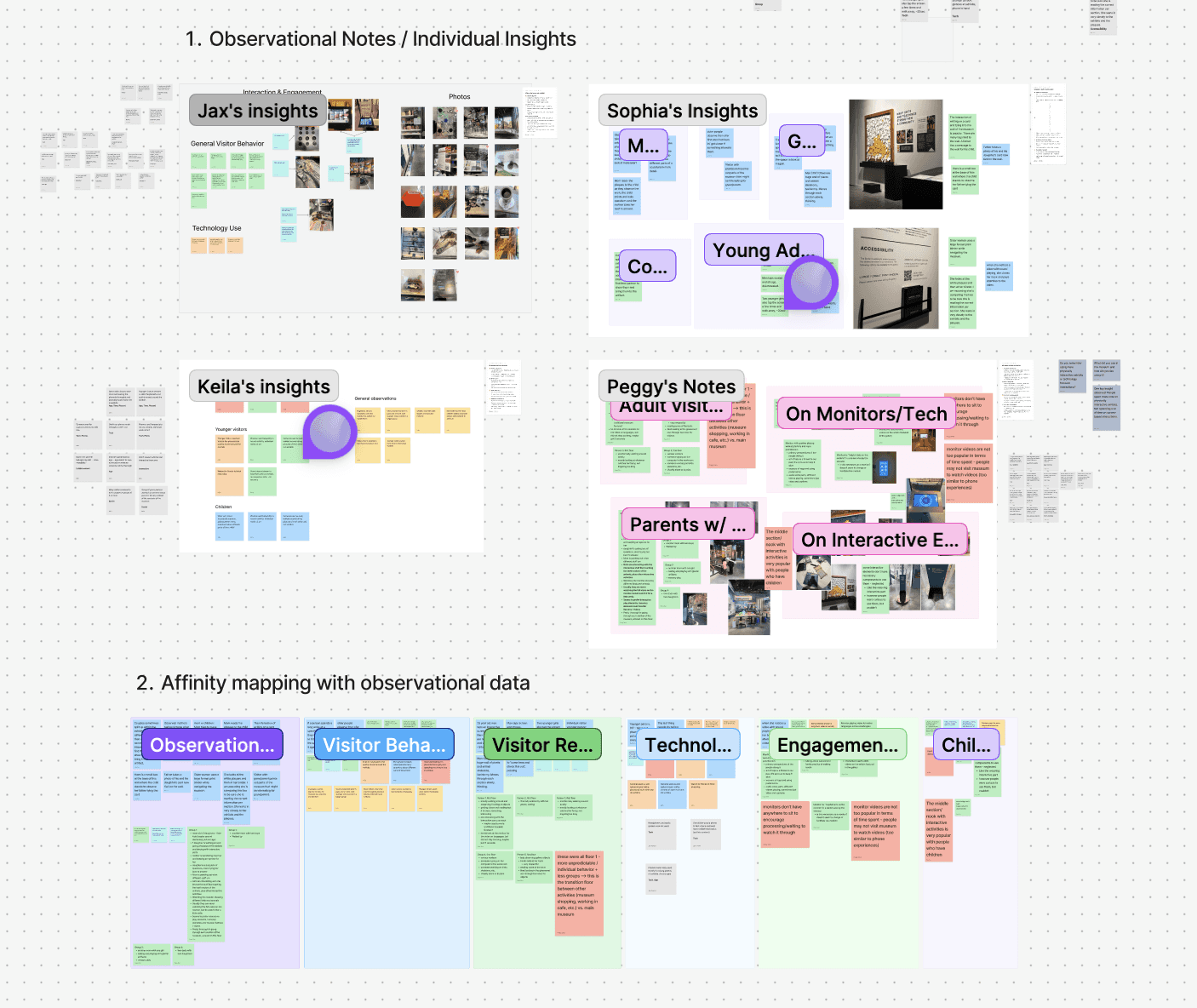
Field observations primer and affinity diagram from field observations, along with photos of the museum environment. We sorted all of our observations along with photos we took of the environment for more context and coded them for themes later to be sorted into an affinity diagram.
in-context interviews

Discussion script for contextual inquiries with sections for quick walk-up questions, and more in-depth questions for visitors, along with a discussion guide for lab techs.
I interviewed visitors and lab technicians directly in the museum rather than pulling them out of the space. With visitors, I asked about their visit mid-to-end; with technicians, I sat at their workstations while they worked.
This in-context approach mattered: visitors flagged confusion as it happened, and techs showed informal workarounds they'd built to communicate with people at the windows. Neither would have surfaced in a conference room.
Key insights
What I found
Visitors weren't disengaged; they were under-informed. People lingered at lab windows and searched their phones for context mid-visit. Three themes came up consistently:
Visitors wanted the process, not just facts. Placards said what something was, not why it mattered. That gap made the whole exhibit feel uncertain.
Technicians were already bridging the gap informally. One had filled whiteboards with context for visitors. The motivation was there; the tools weren't.
Complex technology wasn't the answer. The Burke had tried cameras and TVs before and couldn't sustain them. Staff actively avoided anything fragile or high-maintenance.

Research findings report deck showcasing our top findings and recommendations
What that pointed to
A lightweight, low-maintenance way for technicians to share real-time context, without pulling them from their work or introducing systems that break.
Solution Design
We evaluated ideas against three questions:
Would visitors actually understand it?
Would it hold up over time?
Would technicians use it without disruption?
The third question was decisive; techs told us technology in museums breaks, costs money, and rarely lasts. That ruled out new hardware or installation.
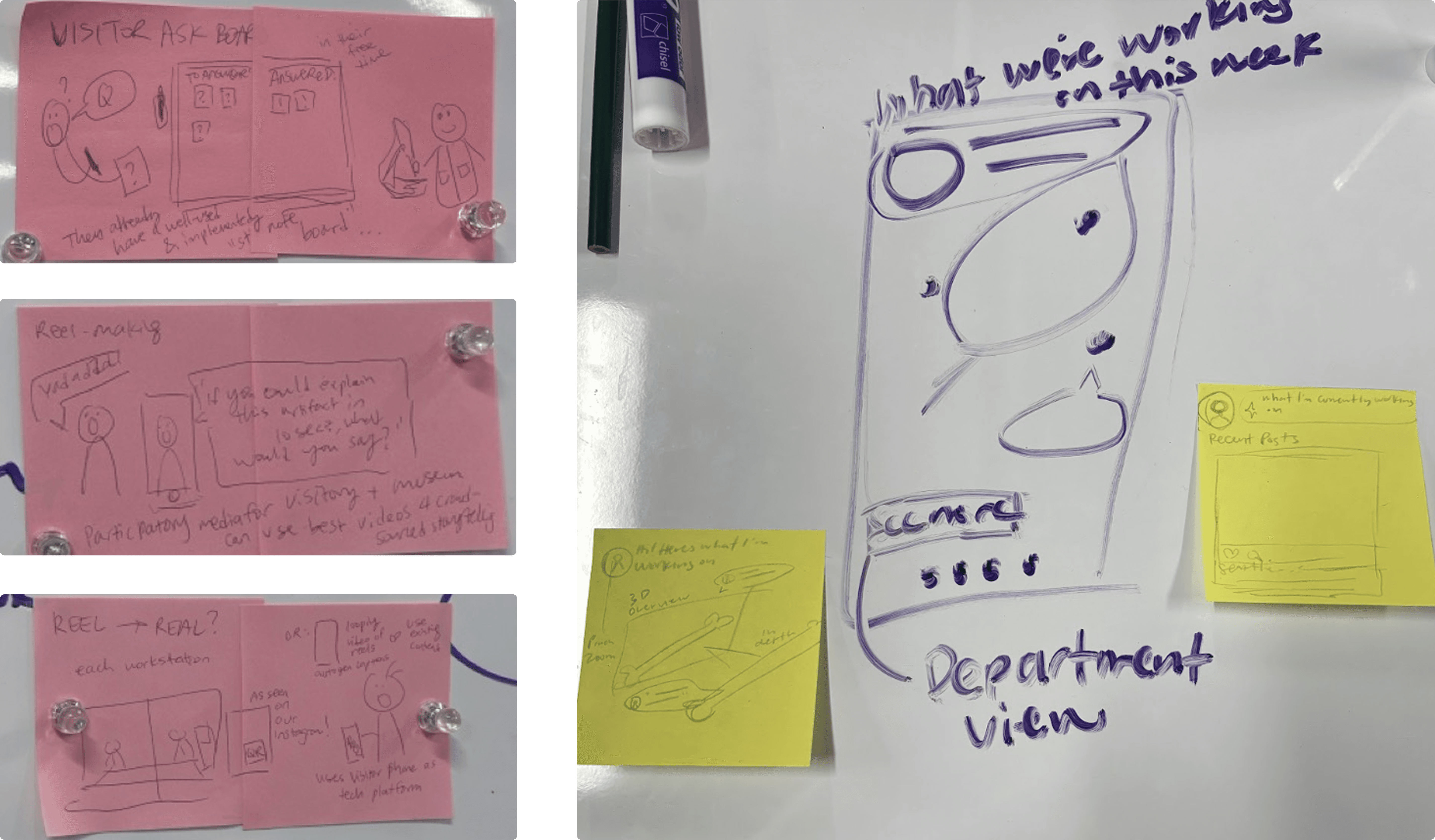
Early concept sketches. A mix of doodling on a whiteboard for group discussion and individual quick brainstorming via post-its was employed
We converged on a two-part system:
A website where visitors scan QR codes to ask questions and learn more
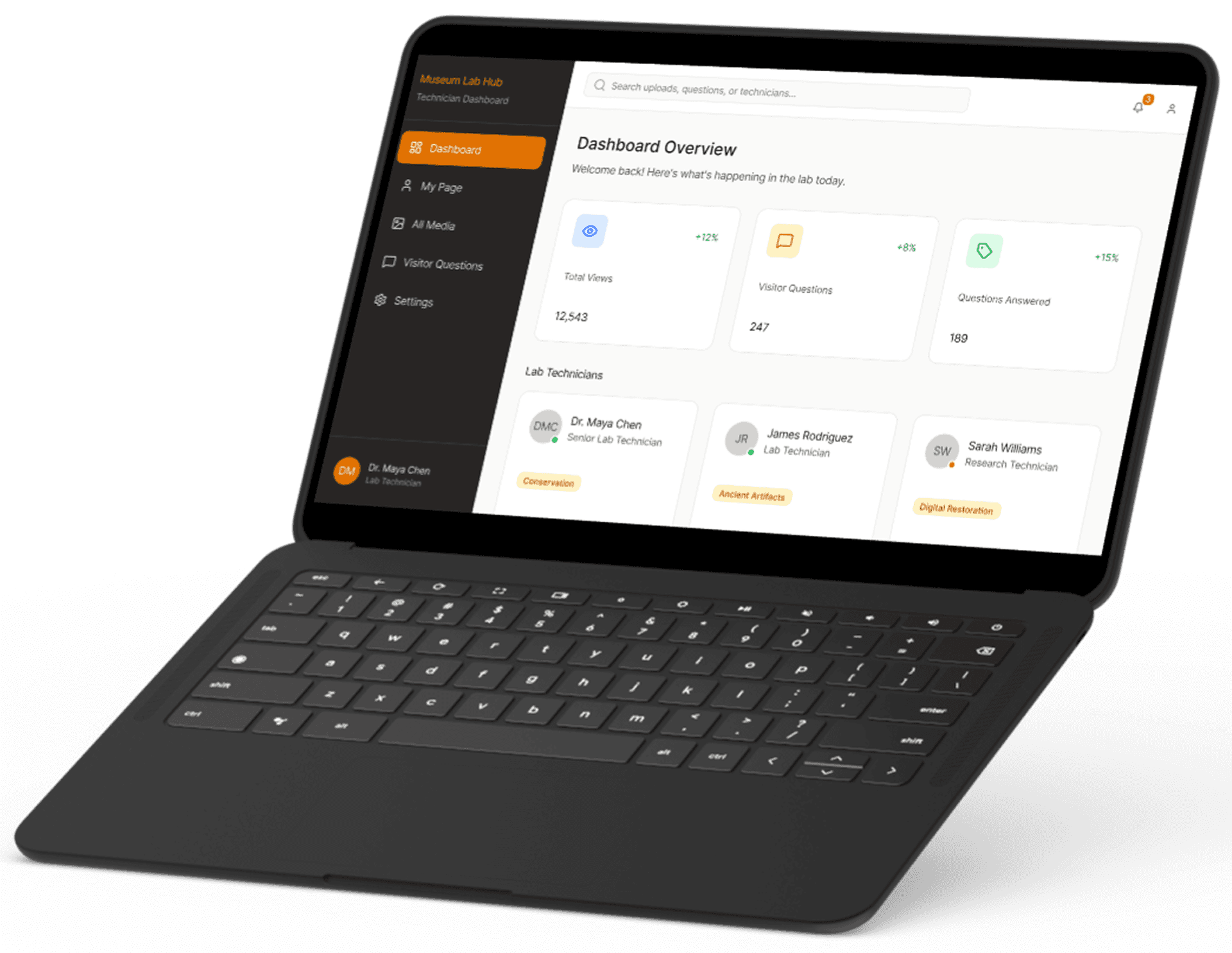
A dashboard where lab techs share updates and livestream without expensive TV tech, and answer visitor questions directly

What I Designed
Lab Tech Dashboard
I vibe-coded the concepts in FigmaMake, then refined them in Figma for interaction and fidelity. The dashboard lets technicians share quick updates about their work in just a few moments, without interrupting their workflow.
Visitor website to ask quesiton and get more context
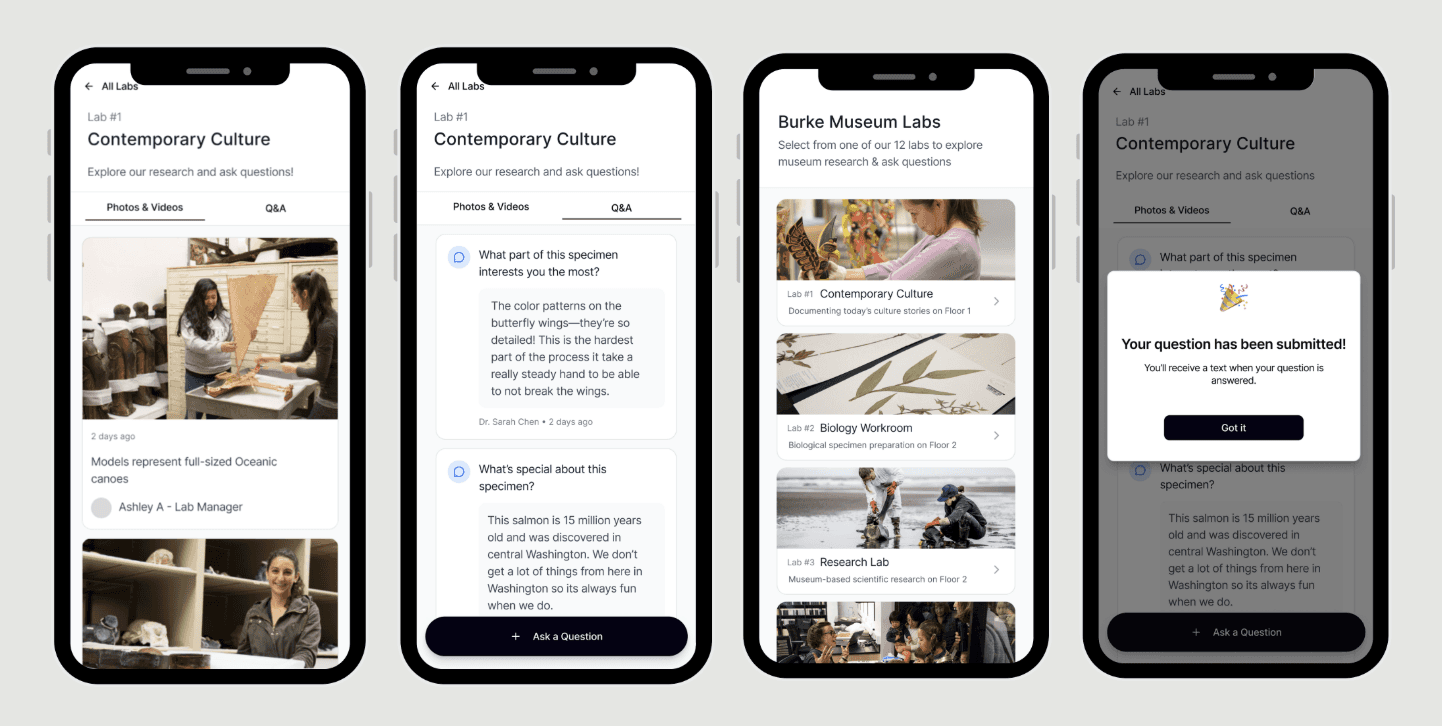
Visitors scan a QR code to reach a mobile-friendly page featuring:
Live videos and updates from lab staff
Clear explanations of ongoing processes
A Q&A system for visitors and staff to engage
Visitors submit questions that technicians answer asynchronously, creating an ongoing loop without requiring real-time interaction.
Together, this system:
Removed reliance on fragile technology
Made lab work more accessible
Balanced visitor curiosity with staff constraints
Validation
I conducted on-site cognitive walkthroughs with 5 participants, asked to:
Learn about a specific lab
Learn what it is currently working on
Submit a question
Findings:
90% average task completion rate
Users successfully accessed and understood lab content
Clear improvements in confidence and comprehension
Due to time constraints around the holidays, we weren't able to usability test the staff dashboard with lab technicians directly; validation there relied on interviews and observation rather than in-context testing, an important remaining gap.
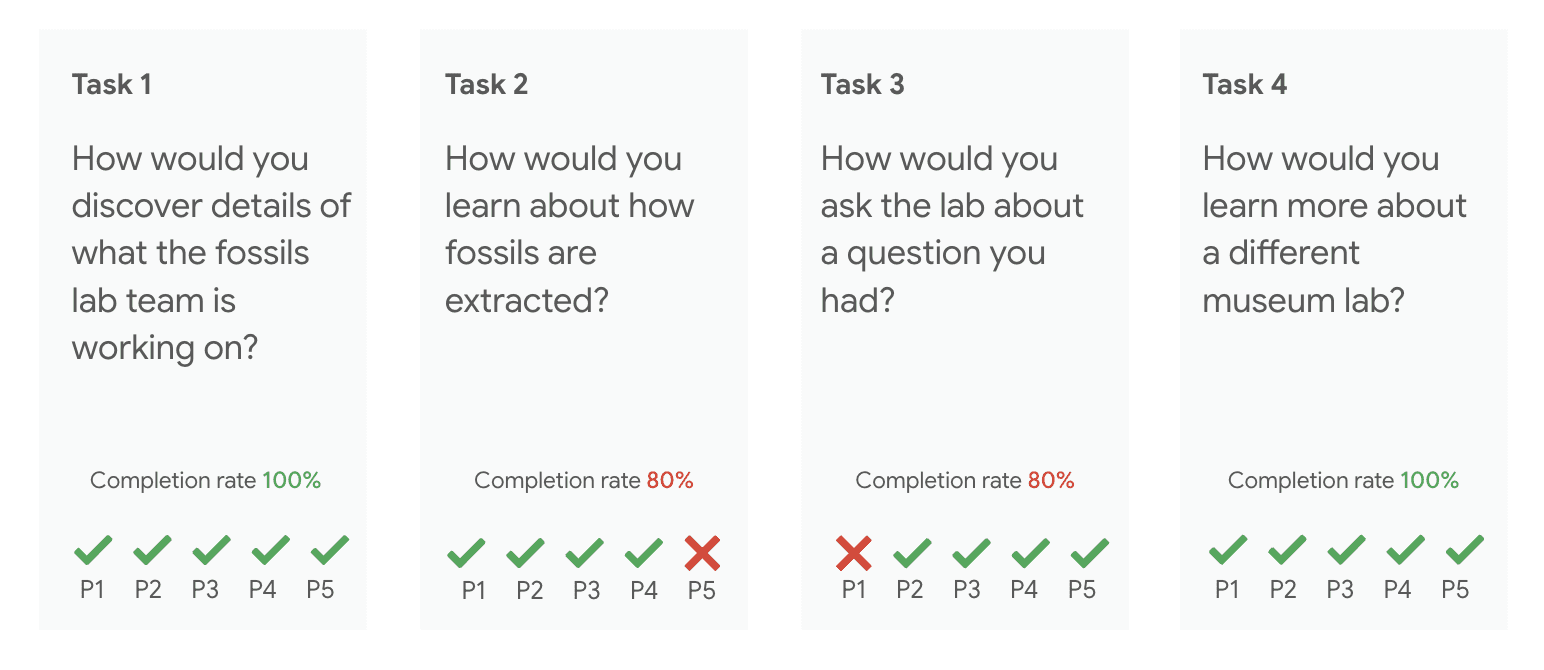
Diagram of pass fail on user tasks. Out of 5 tasks, only 2 tasks were ever failed across 4 participants.

Full research deck showing breakdown of usability issues with priority
Results
The redesigned system gave visitors and technicians a simple, reliable way to communicate across the lab window. Usability testing showed a 90% task completion rate: visitors could find what a lab was working on, understand the process, and submit a question unassisted, with no hardware to break or maintain.
Reflection
The hardest part wasn't technical; it was designing for two user groups whose needs pull against each other: visitors want access, technicians need focus. That tension pushed me toward simplicity, which proved right given the Burkes' history with high-maintenance technology.
The biggest remaining gap is real-world testing with lab technicians on the staff dashboard. That's the obvious next step.